
Best AI Image Generators in 2026: Free & Paid Tools Compared
AI image generators have changed how creators, marketers, bloggers, and small businesses produce visual content. From social media graphics and product concepts to illustrations and marketing materials, these tools can help turn written ideas into images.
However, not every AI image generator works the same way. Some are designed for conversational image creation, while others focus on professional editing, design templates, or typography.
In this guide, we compare five popular AI image generation platforms in 2026: ChatGPT Images, Adobe Firefly, Canva AI, Google Gemini, and Ideogram.
We explore their features, free-access options, limitations, and ideal use cases to help you choose a suitable tool.
Quick Comparison: Best AI Image Generators in 2026
| AI Image Generator | Best For | Free Access |
|---|---|---|
| ChatGPT Images | Conversational image generation and editing | Limited |
| Adobe Firefly | Image creation and creative editing | Limited daily generations |
| Canva AI | Social media designs and visual content | Selected features |
| Google Gemini | Conversational image creation | Available to eligible users |
| Ideogram | Typography, posters and graphic concepts | Check current plan availability |
Note: Features, credits, availability, and pricing can change. Always check the official websites before purchasing.
1. ChatGPT Images — Best for Conversational Image Creation
ChatGPT Images is an image generation and editing experience developed by OpenAI.
Users can describe the image they want using natural language and request changes through follow-up instructions.
Key Features
- Generate images from text descriptions.
- Edit existing images with written instructions.
- Create illustrations, product concepts, and marketing visuals.
- Request different visual styles and aspect ratios.
- Refine images through conversational feedback.
Best For
Bloggers, content creators, marketers, educators, and small businesses that want a flexible image creation assistant.
Pricing and Limitations
ChatGPT offers limited image generation on its free plan. Paid plans provide expanded access, with limits depending on the subscription.
Pros
- Easy conversational interface.
- Supports image creation and editing.
- Useful for a wide range of creative tasks.
Cons
- Free usage is limited.
- Complex images may require several attempts.
- Text, object placement, and small details may need correction.
Official Website: https://chatgpt.com
2. Adobe Firefly — Best for Creative Editing Workflows
Adobe Firefly is a generative AI platform designed for creating and editing visual content.
It offers image generation and creative editing capabilities, including tools that work with Adobe’s broader creative ecosystem.
Key Features
- Generate images from text prompts.
- Edit image regions with generative tools.
- Experiment with different visual styles.
- Use supported features across Adobe creative applications.
- Explore image, video, and other generative media workflows.
Best For
Graphic designers, marketers, creative professionals, and people who already use Adobe software.
Pricing and Limitations
Adobe Firefly offers limited free daily generations and paid plans with additional generative credits and features.
Credit usage depends on the selected model and task.
Pros
- Strong creative editing ecosystem.
- Supports multiple visual workflows.
- Useful for design-oriented projects.
Cons
- Some features require paid access.
- Credit usage can vary.
- Advanced workflows may take time to learn.
Official Website: https://firefly.adobe.com
3. Canva AI — Best for Social Media Graphics
Canva combines design tools, templates, and AI-powered creative features in one platform.
It is particularly useful for creators who need finished designs rather than standalone AI-generated images.
Key Features
- AI-assisted design creation.
- Image generation and editing.
- Social media graphics and presentations.
- Templates for marketing materials.
- Tools for combining images, text, and layouts.
Best For
Social media managers, bloggers, small businesses, students, and beginner designers.
Pricing and Limitations
Canva offers a free plan with limited access to selected AI features. More advanced AI capabilities and higher usage allowances depend on the subscription.
Pros
- Beginner-friendly editing interface.
- Useful templates and design tools.
- Convenient for creating complete social media graphics.
Cons
- Some AI features require paid plans.
- Free AI usage is limited.
- Advanced image editing needs may require other tools.
Official Website: https://www.canva.com
4. Google Gemini — Best for Conversational Visual Ideas
Google Gemini includes image generation capabilities for supported users and accounts.
It can help users develop visual ideas, create images from prompts, and refine creative concepts through conversation.
Key Features
- Image generation from natural language.
- Conversational creative assistance.
- Visual brainstorming.
- Image-related tasks supported by available Gemini models.
- Integration with selected Google services.
Best For
Students, everyday users, marketers, and creators who prefer Google’s AI ecosystem.
Pricing and Limitations
Image generation access depends on the user’s plan, region, and available models. Some capabilities are accessible without a paid subscription, while advanced options may have additional limits.
Pros
- Natural-language interface.
- Useful for creative brainstorming.
- Convenient for users of supported Google services.
Cons
- Availability can vary.
- Usage limits apply.
- Generated details may need correction.
Official Website: https://gemini.google.com
5. Ideogram — Best for Typography and Graphic Concepts
Ideogram is an AI image generation platform with tools for creating visual concepts, graphic designs, and images containing text.
It is worth exploring for projects involving posters, promotional graphics, and typography-oriented designs.
Key Features
- Generate images from text prompts.
- Create typography-focused graphics.
- Explore poster and promotional design concepts.
- Produce variations of creative ideas.
- Access additional generation and editing features depending on the plan.
Best For
Designers, marketers, content creators, and small businesses developing graphics with prominent text.
Pricing and Limitations
Ideogram offers subscription plans with different credit allowances and features. Check its current pricing page for free-access eligibility and restrictions.
Pros
- Useful for typography-oriented image concepts.
- Supports multiple creative styles.
- Offers options for different production needs.
Cons
- Subscription limits vary.
- Generated text still needs proofreading.
- Some advanced features require paid access.
Official Website: https://ideogram.ai
Best AI Image Generation Tools for Ecommerce in 2026
AI image generation tools can help ecommerce businesses create product concepts, promotional graphics, lifestyle scenes, and marketing visuals without organising a traditional photoshoot for every creative idea.
However, different tools are suitable for different ecommerce tasks. Product accuracy, branding consistency, editing control, and commercial-use terms are important considerations.
AI Image Generators for Ecommerce: Quick Comparison
| Tool | Ecommerce Use Case | Key Consideration |
|---|---|---|
| ChatGPT Images | Product lifestyle concepts and promotional visuals | Check product details carefully |
| Adobe Firefly | Marketing image editing and creative campaigns | Review credits and licensing |
| Canva AI | Product promotions, banners and social ads | Useful for complete designs |
| Google Gemini | Product campaign ideas and visual concepts | Verify generated details |
| Ideogram | Promotional posters and text-based graphics | Proofread generated text |
1. Product Lifestyle Images
AI image generators can help sellers visualise products in different environments, such as home interiors, offices, kitchens, and outdoor settings.
These images can be useful for brainstorming advertising concepts. However, sellers should avoid presenting inaccurate AI-generated product details as genuine product photographs.
2. Ecommerce Advertising Creatives
Online stores can use AI tools to experiment with advertising backgrounds, seasonal promotions, and social media campaign concepts.
Canva AI is useful when businesses need to combine visual assets with text, logos, and templates.
3. Product Marketing and Branding
Adobe Firefly and ChatGPT Images can help businesses explore different visual styles and develop creative marketing materials.
Consistent colours, typography, and product representation can make promotional content more recognisable.
4. Promotional Posters and Sale Graphics
Ideogram can be useful for generating poster concepts featuring prominent typography.
Always verify promotional text, prices, discounts, and product claims before publishing.
Which AI Image Generator Is Best for Ecommerce?
For complete marketing designs, Canva is a practical starting point. For conversational product concepts, ChatGPT Images is worth exploring. Adobe Firefly may suit businesses that already use professional creative software.
No single platform is best for every online store. Test the tools using your actual products and marketing requirements before choosing a paid plan.
How to Choose the Best AI Image Generator in 2026
Choosing an AI image generator depends on what you want to create, how frequently you need images, and how much control you need over the final result.
Here are six important factors to consider before selecting a tool.
1. Image Quality and Accuracy
Look for a generator that can produce clear, visually appealing images while following your instructions.
Pay attention to small details such as hands, objects, product shapes, text, and backgrounds.
For ecommerce businesses, accurate product representation is particularly important.
2. Free Plan and Pricing
Some AI image generators provide limited free access, while others require subscriptions for advanced features.
Before choosing a paid plan, compare generation limits, available models, editing features, and export options.
3. Ease of Use
Beginners may prefer tools with conversational interfaces or ready-made templates.
More experienced designers may benefit from platforms with advanced editing controls.
4. Image Editing Capabilities
Consider whether the tool allows you to modify existing images, remove or replace elements, adjust backgrounds, and refine generated results.
Editing capabilities can be especially useful for marketing campaigns and social media content.
5. Commercial Usage Rights
If you plan to use AI-generated images for advertising, websites, or ecommerce, review the provider’s current commercial-use terms.
Also consider applicable copyright rules, marketplace policies, and potential third-party intellectual property rights.
6. Your Specific Use Case
Different tools may suit different projects:
- Blogging: Illustrations, featured images, and article visuals.
- Ecommerce: Product concepts, promotional banners, and lifestyle marketing graphics.
- Social Media: Instagram posts, Pinterest graphics, and advertising creatives.
- Graphic Design: Posters, typography, and professional editing.
- Business Marketing: Campaign concepts, presentation visuals, and branded content.
The best approach is to test a few tools with the same prompt and compare the results against your actual requirements.
Which AI Image Generator Should You Choose?
The right choice depends on your project.
For general image creation: ChatGPT Images is a useful starting point.
For professional creative editing: Consider Adobe Firefly.
For social media designs: Canva offers an accessible design workflow.
For conversational visual brainstorming: Explore Google Gemini.
For typography and posters: Ideogram is worth comparing.
These recommendations are based on the tools’ documented capabilities, not a controlled image-quality benchmark.
Free vs Paid AI Image Generators
Free access can be useful for learning and occasional creative tasks. However, free plans may restrict the number of generations, available models, editing features, export quality, or commercial usage.
Paid plans may be worthwhile for users who regularly produce marketing graphics or need advanced editing features.
Before subscribing, check the provider’s current usage limits, licensing terms, and commercial-use policies.
Real AI Image Generation Test: Gemini vs Adobe Firefly vs ChatGPT Images
To compare AI image generation results, we created three images using the same product photography prompt.
The goal was to evaluate how each tool handled product appearance, lighting, background composition, and visual realism.
Our Test Prompt
A premium stainless steel water bottle standing on a wooden desk beside a laptop, natural morning sunlight, realistic product photography, clean modern workspace, sharp details, professional ecommerce advertising style, 4:5 aspect ratio.
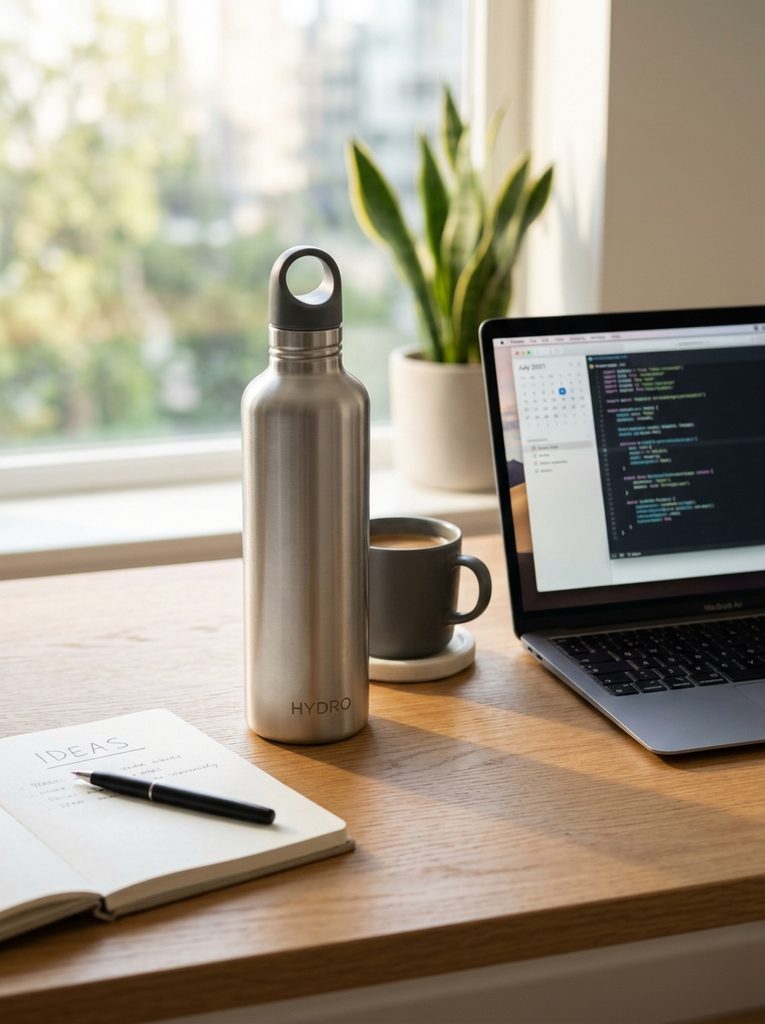
1. Google Gemini — Image Generation Result
Google Gemini produced a lifestyle-style product image featuring a stainless steel bottle, laptop, coffee cup, notebook, and natural window lighting.
Our observations:
- Natural-looking workspace composition.
- Realistic lighting and background blur.
- Bottle includes a handle-style cap.
- Additional branding-like text appears on the bottle.
The result is useful for lifestyle marketing concepts, but generated branding and product details should be verified before commercial use.
2. Adobe Firefly — Image Generation Result
The Adobe Firefly result features a stainless steel bottle positioned beside a laptop in a sunlit workspace.
Our observations:
- Warm, visually appealing sunlight.
- Clean, minimalist composition.
- Strong separation between the bottle and background.
- Some background details appear softer than the main product.
This result could work well as a starting point for lifestyle advertising graphics.

3. ChatGPT Images — Image Generation Result
ChatGPT Images produced a close-up product composition featuring a metallic water bottle on a wooden desk with a laptop and surrounding workspace objects.
Our observations:
- Detailed metallic reflections.
- Strong product visibility.
- Realistic workspace lighting.
- Clear focus on the bottle.
This image is particularly suitable as a visual concept for ecommerce advertising.

Image Quality Comparison
| Criteria | Google Gemini | Adobe Firefly | ChatGPT Images |
|---|---|---|---|
| Product Visibility | Good | Good | Excellent |
| Natural Lighting | Excellent | Excellent | Excellent |
| Background Composition | Detailed | Minimal | Detailed |
| Product Detail | Good | Very Good | Excellent |
| Overall Prompt Relevance | Good | Very Good | Excellent |
Which AI Image Generator Performed Best?
In this small visual comparison, ChatGPT Images produced our preferred result for product-focused ecommerce imagery because the bottle was prominent and its metallic texture was clearly visible.
Adobe Firefly created an appealing lifestyle composition with warm lighting, while Gemini produced a natural workspace scene.
These observations are subjective and based on one image from each platform. They do not establish that one AI image generator consistently outperforms the others.
For commercial product listings, always verify product accuracy, branding, and marketplace image requirements before publishing AI-generated visuals.
Frequently Asked Questions
What is the best AI image generator in 2026?
There is no single best option for every user. ChatGPT Images, Adobe Firefly, Canva, Gemini, and Ideogram offer different strengths for image creation and design.
Can I generate AI images for free?
Several platforms offer limited free image generation or selected free AI features. Availability and limits depend on the provider.
What are the best AI image generation tools for ecommerce in 2026?
ChatGPT Images, Adobe Firefly, Canva AI, Google Gemini, and Ideogram can support different ecommerce creative tasks. Canva is useful for promotional layouts, while ChatGPT Images and Adobe Firefly can help develop and edit visual concepts.
Can I use AI-generated images for ecommerce product listings?
AI-generated images may be useful for marketing, but sellers should follow marketplace image policies and accurately represent their products. Avoid misleading product details, inaccurate colours, invented features, or images that could confuse buyers.
Which AI image generator is best for social media?
Canva is a useful choice for creating finished social media graphics because it combines AI features with templates and editing tools.
Can AI-generated images be used commercially?
Commercial usage depends on the provider’s terms, the generated content, and applicable law. Review licensing terms and avoid infringing third-party rights.
Are AI-generated images always accurate?
No. AI-generated images may contain incorrect text, unusual details, distorted objects, or other errors. Review images carefully before publishing.
Best Free AI Image Generation Tools in 2026
Looking for free AI image generation tools in 2026? Several popular platforms offer free or limited-access options for creating images, marketing graphics, and visual concepts.
However, free plans often have restrictions on image generation limits, available models, editing features, or commercial usage.
1. ChatGPT Images
ChatGPT Images allows users to generate images through natural-language instructions.
It is useful for creative concepts, social media graphics, product photography ideas, and visual storytelling.
Best for: Beginners who prefer conversational image creation.
Free access: Limited image generation may be available depending on account eligibility and current usage limits.
2. Google Gemini
Google Gemini supports AI image generation through eligible models and accounts.
Users can create visual concepts, explore different styles, and refine image ideas through conversational prompts.
Best for: Creative brainstorming and lifestyle image concepts.
Free access: Availability and generation limits depend on the account, region, and selected model.
3. Adobe Firefly
Adobe Firefly provides generative image creation and editing features for creative projects.
It can help designers explore advertising concepts, visual styles, and promotional images.
Best for: Marketing visuals and creative editing workflows.
Free access: Limited credits or trial access may be available, depending on current plans.
4. Canva AI
Canva combines AI creative features with templates and design tools.
It can be particularly useful for creating social media posts, banners, and promotional graphics.
Best for: Small businesses and social media creators.
Free access: Selected AI features may be available with usage restrictions.
Free AI Image Generators Comparison
| Tool | Best Use Case | Main Limitation |
|---|---|---|
| ChatGPT Images | Conversational image creation | Generation limits |
| Google Gemini | Creative concepts | Model and account restrictions |
| Adobe Firefly | Marketing visuals | Credit-based access |
| Canva AI | Social media designs | Restricted premium features |
Best AI Image Generators for Ecommerce in 2026
AI image generators can help ecommerce sellers create marketing visuals, product photography concepts, social media advertisements, and promotional graphics.
For Shopify, Etsy, and eBay sellers, choosing the right AI image generator depends on image quality, editing capabilities, product accuracy, and commercial-use requirements.
1. ChatGPT Images — Best for Product Photography Concepts
ChatGPT Images is useful for generating lifestyle product scenes, advertising concepts, and promotional visuals through natural-language prompts.
Best for: Ecommerce sellers exploring creative product presentations.
Limitation: Generated product details may differ from real products. Always verify accuracy before using images in listings.
2. Adobe Firefly — Best for Creative Editing
Adobe Firefly offers image generation and editing workflows that can support marketing design and promotional content creation.
Best for: Ecommerce brands developing advertising visuals and creative campaigns.
Limitation: Available features, credits, and supported models depend on the selected plan.
3. Google Gemini — Best for Lifestyle Image Concepts
Google Gemini can help generate lifestyle imagery and creative product scenes from text prompts.
Best for: Sellers experimenting with different product backgrounds and marketing concepts.
Limitation: Model availability and generation limits vary by account and region.
4. Canva AI — Best for Ecommerce Social Media Graphics
Canva combines AI-assisted design features with templates for advertisements, product promotions, and social media posts.
Best for: Small businesses creating Pinterest pins, Instagram posts, and promotional banners.
Limitation: Some AI features require paid access.
AI Image Generators for Ecommerce: Comparison
| Tool | Best Use Case | Main Strength |
|---|---|---|
| ChatGPT Images | Product concepts | Conversational editing |
| Adobe Firefly | Advertising visuals | Creative editing workflows |
| Google Gemini | Lifestyle concepts | Prompt-based generation |
| Canva AI | Social media graphics | Templates and layouts |
Can You Use AI-Generated Images for Ecommerce Listings?
AI-generated images can be useful for marketing, but sellers must ensure that product images accurately represent the actual item being sold.
Marketplace image requirements vary, and AI-generated product details may not match real products.
For accurate listings, consider starting with genuine product photographs and using appropriate AI editing tools rather than generating fictional product representations.
Learn More About AI Product Photography
Want to create professional-looking product marketing visuals?
Read our AI Product Photography Guide for practical prompts, image comparisons, and ecommerce photography tips.
You can also explore our Free Product Description Generator to create structured descriptions for ecommerce products.
Which Free AI Image Generator Should You Choose?
For beginners, ChatGPT Images and Gemini are useful starting points for experimenting with image generation.
Adobe Firefly is worth exploring for creative editing and promotional design.
Canva AI is especially useful when you need to combine generated visuals with ready-made design layouts.
Our recommendation: Start with the tool that best matches your workflow, compare the actual outputs, and review current usage limits and commercial-use terms before publishing images for business purposes.
Final Verdict
AI image generators can help creators and businesses explore ideas and produce visual content more efficiently.
ChatGPT Images, Adobe Firefly, Canva AI, Google Gemini, and Ideogram each offer different strengths.
For the best results, choose a tool based on your actual workflow, test its outputs, and verify the current features and usage conditions before subscribing.
Last reviewed: October 2026.
